Focus
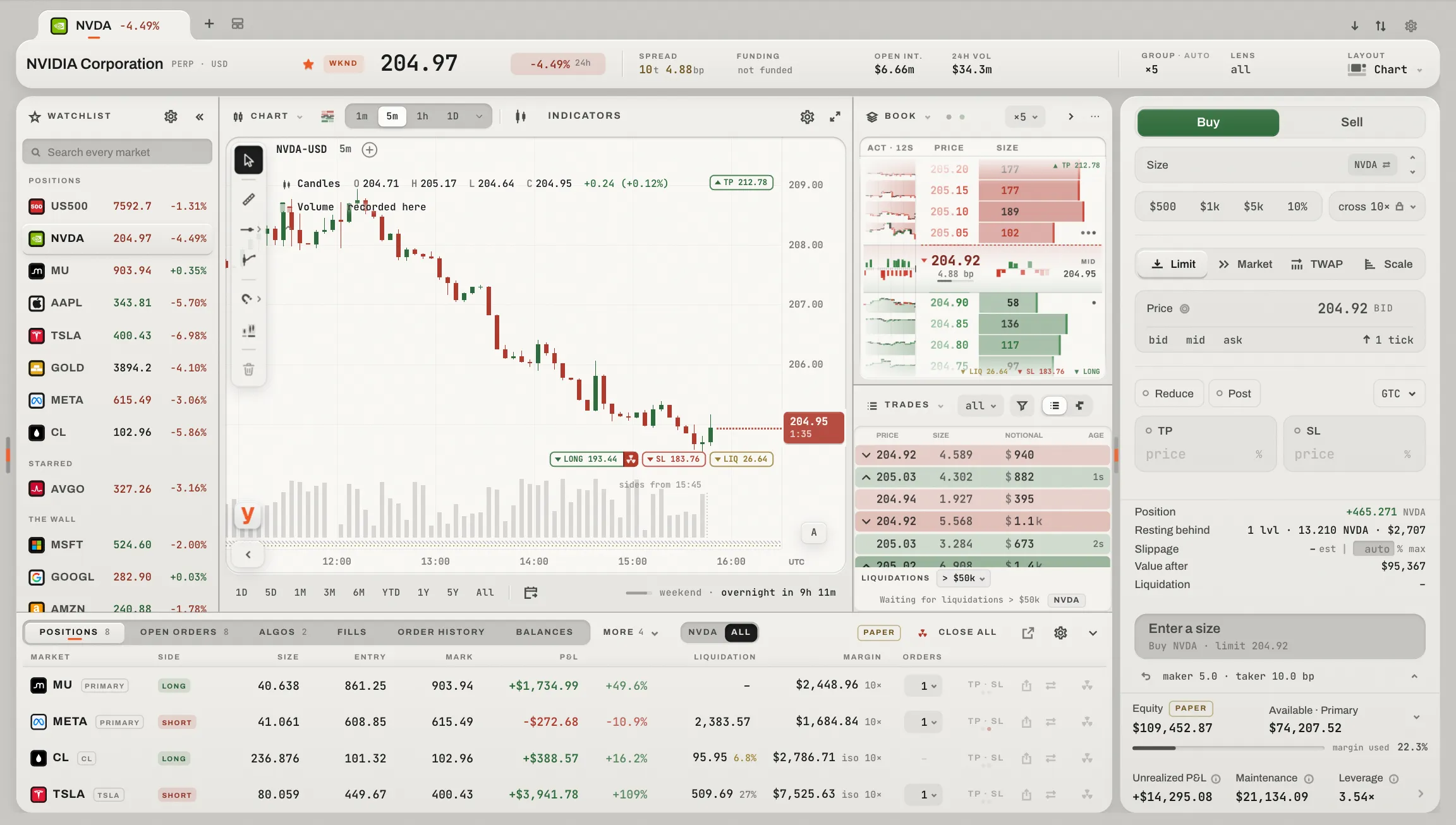
One market, everything about it, and the place you trade it. Nothing said twice: the market bar says what the market is and how it trades now; the desk lays out its instruments the way you choose; the account under it holds what you hold and what works; the ticket on the right builds an order on the book it would meet, with the account's figures always in view under it.
 1234567
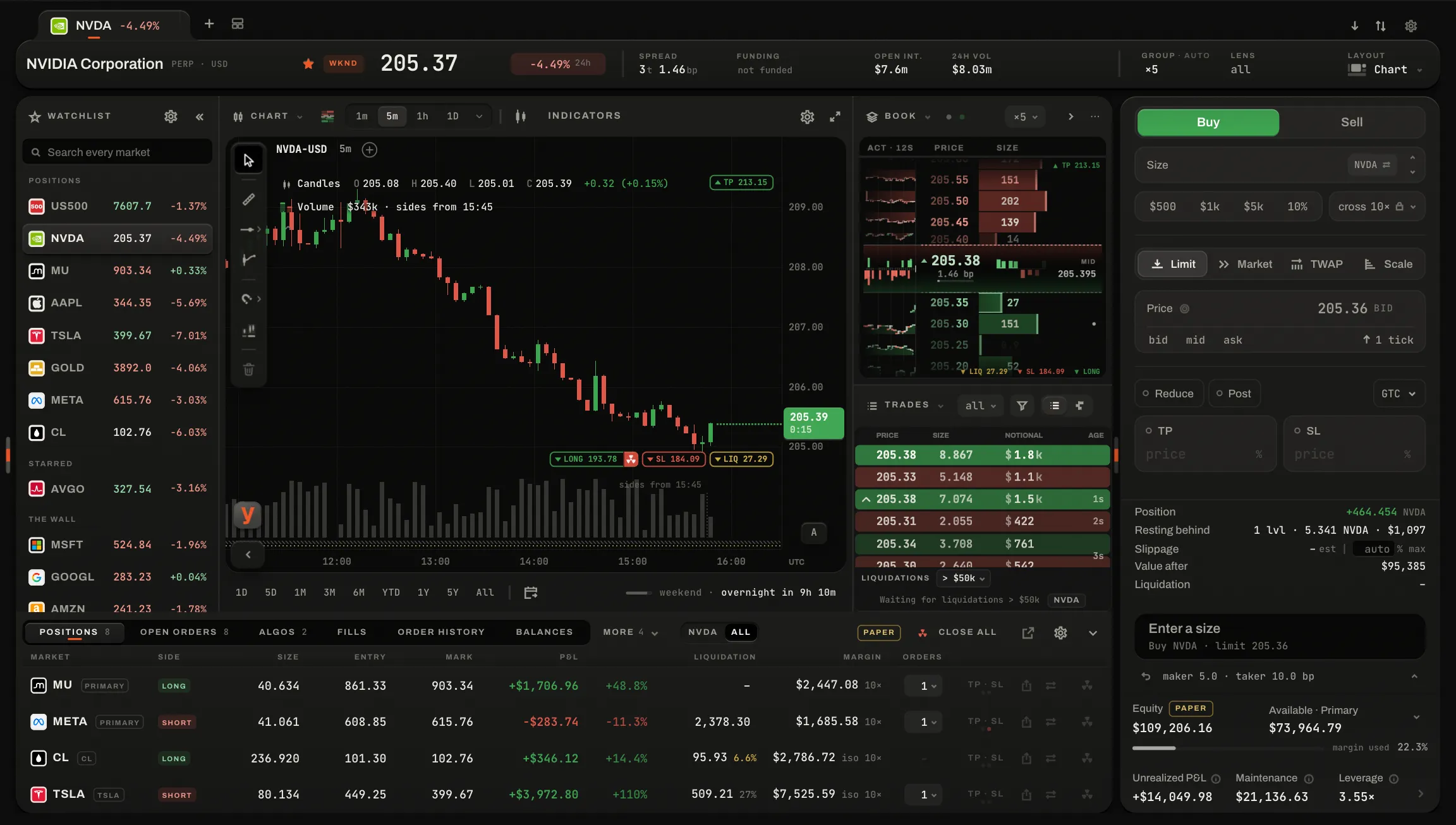
The page as it ships, on the Tape layout and the demo account, at 1440 × 900. The desk between the bar and the ticket is yours to lay out (Layouts).
The market and its star, its session, the last print and the day's change, then the readings; at its right edge the grouping, the lens and the layout. Under it, the ticker bar (The ticker bar).
QFEX's candles, with your orders and position on them (The chart).
Every print, newest first, beside the candles (The tape).
The market's levels and their queues, beside the ticket (The order book).
Your positions, each read with its orders on one rail, then open orders, algos, fills, the history, funding and balances, for this market or all: the same under every layout (The account panel).
Limit, Market and Pro, and what the order would cost and leave before you send it (The ticket).
Unrealized P&L, maintenance, margin usage and leverage, always in view (The account block).
The market bar
- The market
- A press (or ⌘K) switches it; beside it, open or closed: QFEX trades around the clock, but the market's own session says how its book behaves.
- It holds still
- The bar's fields keep their width and follow a tab press in the same frame, so nothing shifts when you change tab.
- Day's change
- From the open of QFEX's own one-hour bar a day back to the mid now; a market listed inside the day says its hours instead (
8.0h). - Spread · funding
- The spread in ticks and basis points; the rate the next settlement would pay and when it settles, every hour and only inside the market's funding hours.
- Open int. · 24h vol
- What is open on the market, and what traded in the last day, in dollars.
- Releases · band
- Only when they matter: a release of the market or its economy soon or newly out; a price three quarters of the way to the band QFEX enforces, warm past 90%.
- Grouping · lens · layout
- The market's one grouping (
auto ×10, or×10when it is yours), the lens (what its two cuts keep), and your layout's name, with a dot when a panel stands down for want of room.
The ticker bar
Your wall's markets and the ones you star, once each, in a line under the market bar; a press opens one here. Its × turns it off for this layout, and the layout key's Ticker bar brings it back.
The heat points the chart
Point at the heatmap and the chart draws its crosshair at the same time and price, while the heat's own reading rises along the lane's foot: a level, a walk or a print (The heatmap).
Holding it still
Space over a ladder or the book, or the snowflake in its head, freezes it: the plate goes cold while the feed keeps arriving underneath (Freeze). The chart does not freeze; it has its own hand.
The watchlist's edge
A drawer waits at the page's left edge and opens the watchlist. { opens and closes it.
- It pushes, never covers
- The drawer makes its room by moving the desk aside, and never pushes the layout's chart off it.
- On the desk
- Where the desk shows the watchlist itself, the drawer is not offered.
Keys on this page
The wall's execution keys too, off until you take the execution round (Execution keys). The ticket's few are on The ticket; a book's own, space and r, on Your hands on it.
The account panel
Under the desk, the same under every layout: one row of the account's tabs and the one panel the tab names. Positions, Open orders, Algos, Fills, Order history, Funding, Balances, each with its count; then this market or all, the tab's one bulk act, the way to its page of the Portfolio, the account's word, its settings and the fold.

 1234567
On the demo account at 1440 × 900: Positions, with NVDA in hand.
Positions, Open orders, Algos, Fills, Order history, Funding and Balances, each with its count; a narrow panel folds the last into More.
One market, or every market with this one first.
The tab's one bulk act, the way to its page of the Portfolio, the account's word, its settings and the fold.
Every position, then every market with something working and nothing held, each row ending in its key.
The market in hand, its side and size, its P&L the one figure that leads.
Its liquidation, stop, entry, mark and target on one axis made for it, every resting order a tick.
Each with its kind, its side, how much at what, how far the mark is from it, and its cancel.
The position and its orders
Positions is the markets in play, not a table: every position, then every market with something working and nothing held, each with its side, size, P&L and how many orders work on it. A position's red nuke closes it and an entry's yellow one cancels what works there, each asked first with what it would do. The market under the pointer is read whole beside the list.
- The rail
- A price axis made for the position: the entry, the mark, the stops and targets and the orders, with a far liquidation standing at the rail's end with its price and its distance. Every resting order is a tick in its side's hue.
- Carried on the rail
- The take-profit and the stop-loss drag along it; one carried past the price it may not cross stops there with the rule under it (
BELOW 239.82) and glides home if let go there. - Which market
- The one under the pointer, else the one pressed, else this page's, else the first. ↑ and ↓ walk the list.
The other tabs
- Open orders · Order history
- What is working, and what is done, filtered.
- Algos
- Each schedule's progress as a bar, what it did, its size, what is left and its stop.
- Fills
- Every fill, newest first, with its fee and whether it took or made.
- Funding
- Each hour paid or received, the largest leg, and what is accruing now.
- Balances
- What the account holds, beside its margin: how much of it is working and how far liquidation is.
- This market · All
- The bulk act follows it (Close all, Cancel all, or Close NVDA while narrowed) and always asks first (Confirmations).
- Signed out
- Not connected, with Connect: nothing of the account is drawn until a session is open, and working orders keep working meanwhile.
A narrow panel folds the tabs it cannot fit into one More key, never Positions or the tab in force.
Its settings
Its ⚙, or Bottom row in the layouts panel, holds which tabs show and their order, and the columns that matter on each tab. They are kept once, for Focus and the wall. The fold takes the panel down to its tabs and gives the desk the room; a two-finger swipe over its tabs raises or lowers it.
The account block
Four figures never out of sight while you trade: what your positions are worth now, how close the account is to liquidation, how much of it is committed, and how leveraged it is. Each opens to what it is made of.
What each one is
- Unrealized P&L
- What the open positions would realise if closed at QFEX's mark, the price margin and liquidation are marked against. Fees to close are not in it.
- Maintenance
- The margin QFEX liquidates below: two thirds of the initial margin at each market's leverage.
- Margin usage
- The initial margin the positions hold plus what working orders reserve, over equity. It warms at 80%; at 100% nothing more can be opened.
- Leverage
- Every position's notional at the mark, long and short added, over equity.
- When it cannot be live
- Signed out it says
not connectedand draws no figure; with the account open in another tab of this browser the figures are that tab's; while the feed is down they are the last known, and say so.