The wall
Many markets at once, each on a card, on a grid you cut yourself, as order books, heat plates or charts. It trades from one ticket in a column on its left, with your account under the grid.
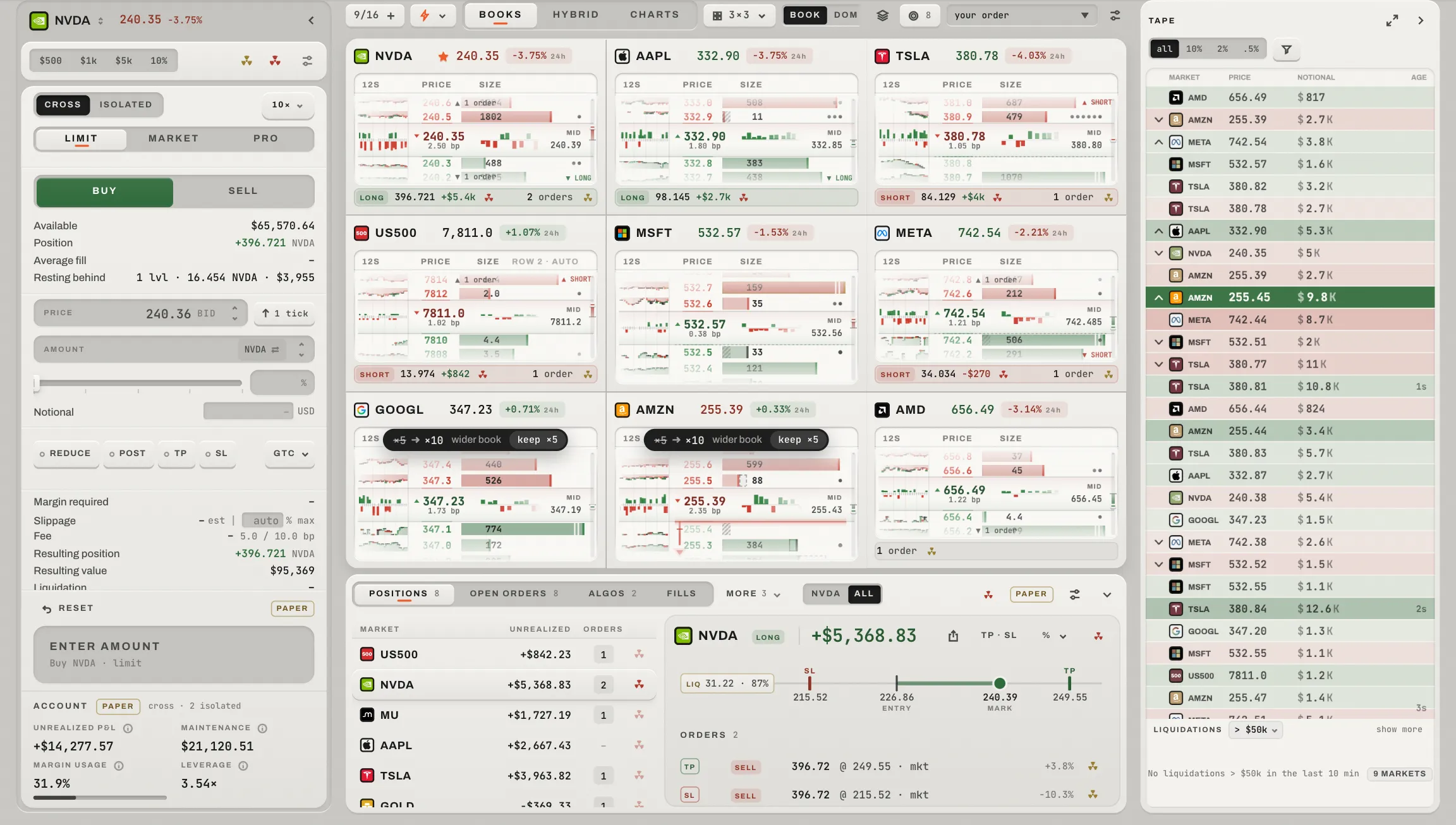
 12345
On the demo account at 1440 × 900: nine order books, the ticket on the left, the account under the cards and the tape on the right.
The markets key and the preset the wall came from; the face; the layout; freeze; your positions, the sort (point at it and every card says its figure); the settings key for every card at once.
One market each: a head, and a body in the wall's face (A card).
The wall's one ticket in a column, folded to a tab in one press (Trading from the wall).
The account panel, as on Focus (The account panel).
The markets on the wall's cards as they print now. Its maximise opens it into the tape page (The tape).
Three faces
- Chart
- Every card a chart plate, carrying everything you hold on the market (Orders on the chart). The linked crosshair draws the moment under the pointer on every other plate.
- Hybrid
- Every card a heat plate: the heat lane beside the book or its DOM.
- Book
- Every card an order book, a DOM, or a Delta: bought less sold at each price, with the running delta since the card began counting (
SINCE 10:47).
Each face keeps its own layout and seams.
The wall as Spaghetti
The bar's Lines key lays the wall's markets over their own cards as one Spaghetti pane: each market's line against the venue, on the Spaghetti page's window, so a whole wall reads as one cross-section. Esc, the ✕ or the key gives the cards back; a press on a line opens that market in Focus.
Cutting the grid
- The layout popover
- Every layout as a picture of the wall it makes, then any size, up to sixteen cards. Fewer cells than markets keeps the rest (
+2), and a grid again brings them back. Even all puts every border back. - Adding
- The markets key (or ⌘K) adds and removes markets, up to sixteen; a grid made bigger fills its new cells from the preset the wall came from.
- A bigger card says more
- A big enough card adds a second line: the spread, open interest, the day's volume and funding.
Presets
A wall is dealt in one press, and dealt in order. The key beside the markets key names the preset the wall came from and opens the presets: live ones ranked by the venue now, and the walls you saved.
- Live
- Most traded, open interest, up and down today, trending, funding extremes, the tightest books, your positions, favourites, a sector. Movers, funding and tight books are ranked among liquid books only.
- It sets its own sort
- A preset sets the wall's sort to the ranking it was cut by.
- Yours afterwards
- A sort you pick afterwards wins; Undo gives back the wall and its sort.
- Saved
- Your own walls, kept in this browser.
Two walls, two screens
/wall/<preset> is a window with a wall of its own, dealt from that preset when it opens. Open in a window places it on your other screen. Each window keeps its own wall.