A card
A card is one market: a head with the few keys that act on it, a body in the wall's face, and settings of its own that never force themselves on the rest.
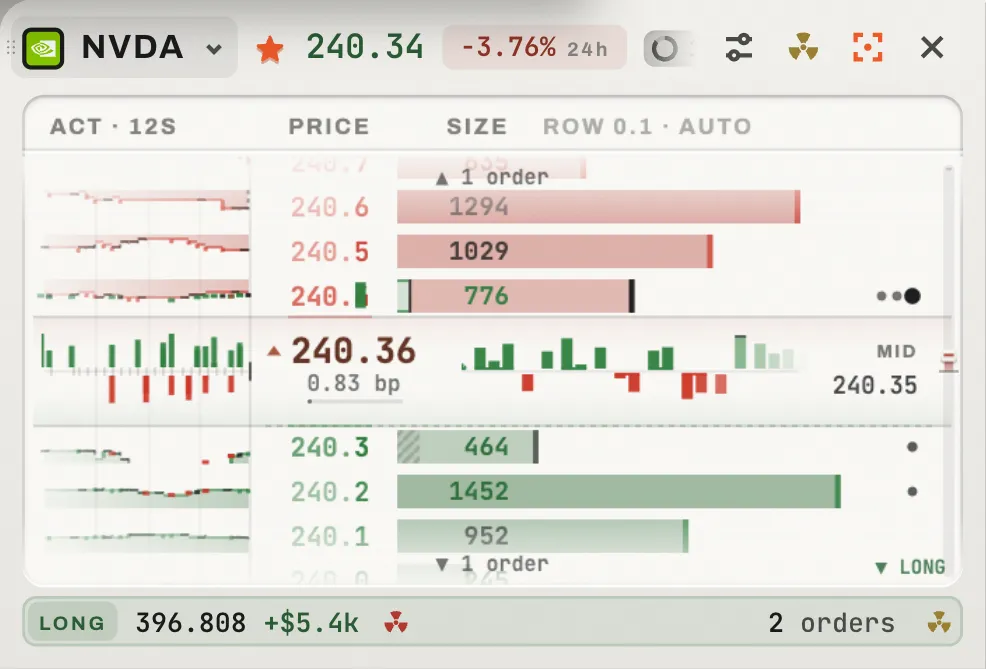
 12345678910
A card with the pointer on its head: the grip and the keys come under the pointer, never at rest.
Drag the head to reorder.
Its mark and ticker. A press opens the finder on the card; a market already on the wall swaps with this one.
Keeps the market among your favourites.
The last price and the day's change, with its window (−1.13% 24h).
The book's row in price, on the card: type it, or step it with − and +. A card's grouping.
The yellow nuke: cancel every order on this market, asked, with a box to close the position too.
The orange key opens the market in Focus; so does a double-click on the head.
Takes the card off the wall; the last card stays.
The face: order book, heat plate or chart plate (Your hands on it, The heatmap).
Your position here (side, size, P&L) with the red nuke that closes it, and your working orders with the yellow nuke, each asking first with what it would do.
A card's grouping
A card with a book carries its grouping on its second line: the row in price, a number you type into, with − and + beside it. It is the market's one grouping, so every book of the market regroups at once, here and in Focus (Grouping and the lens).
- The number
- Type a row in price and press Enter; it is taken to the nearest whole number of ticks. Esc puts it back.
- − and +
- One step finer or wider along the market's own groupings.
- The list
- Taking the number opens six steps of the market's ladder under it, the one in force lit; ↓ and ↑ walk it.
- Auto and ↺
- Auto reads beside it while the book chooses its own rows; once you set one, ↺ gives it back to auto.
Sort and positions
The wall never reorders itself. A ranking applies once, when you choose it or a preset deals it; after that a key offers the new order, with how many cards would move, and nothing moves until you press it.
The new-order key
The key's tip names which cards would move and how far. Press it and they travel into place.
What it ranks by
- Your order
- Where you put the cards. Dragging a card sets this.
- Yours
- Open P&L and position size; hidden figures stay hidden when privacy is on.
- Volume
- Recent volume, the day's, and whether it is growing.
- Volatility
- Over several windows.
- The venue's
- Open interest, funding, price, the day's change, the spread, the symbol.
Each ranking has its natural direction and a key to flip it. A card with no reading shows a dash and ranks last.
Your positions, as a wall
The positions key turns the wall into every market you hold, ranked by the sort. Your wall is untouched underneath: the key again brings it back. Holding nothing, it offers Show my wall. A held card's last line is washed in its side's colour, so a wall says where your risk is at a glance.